Train an Autoencoder in Fastai, in 5 steps
1-min read
Front Matter
layout
post
date
2020-10-04 17:45:00 +0530
categories
posts
Copied Raw Markdown!
This is a quick post to understand the coding philosophy of fastai v2.0. I wanted to train an autoencoder on a set of images using fastai library and here's how it went. (It is easy, only if you know what you are looking at)
- Get the imports and load the path that contains all the data
import warnings; warnings.filterwarnings("ignore") # I have some RGBA images that keep warning me
from fastai.vision.all import *
from torch_snippets import * # This is my library, I wrapped a lot of functions into simple names

PATH = '/folder/of/images/'
- One of the flexible things of fastai is the
DataBlockapi. Create a data-bunch template as follows -
shoes_db =  DataBlock(
    blocks=(ImageBlock, ImageBlock),                 # Our input and output are both images
    get_items=get_image_files,                       # I'm yet to explore this, but all we are saying is "get paths of all images from this folder"
    splitter=RandomSplitter(valid_pct=0.2, seed=42), # self explanatory
    get_y=lambda x: read(x,1),                       # The target as a function of image path - read the image in color mode (torch_snippets function)
    item_tfms=RandomResizedCrop(128, min_scale=1),   # Resize every image like so, while loading
    batch_tfms=aug_transforms(mult=2.0,              # Augmentation functions.
                                do_flip=True,
                                flip_vert=True,
                                max_rotate=0,
                                max_warp=0,
                                xtra_tfms=[Normalize.from_stats(*imagenet_stats)]),
)

shoe_dls = shoes_db.dataloaders(path, bs=128)
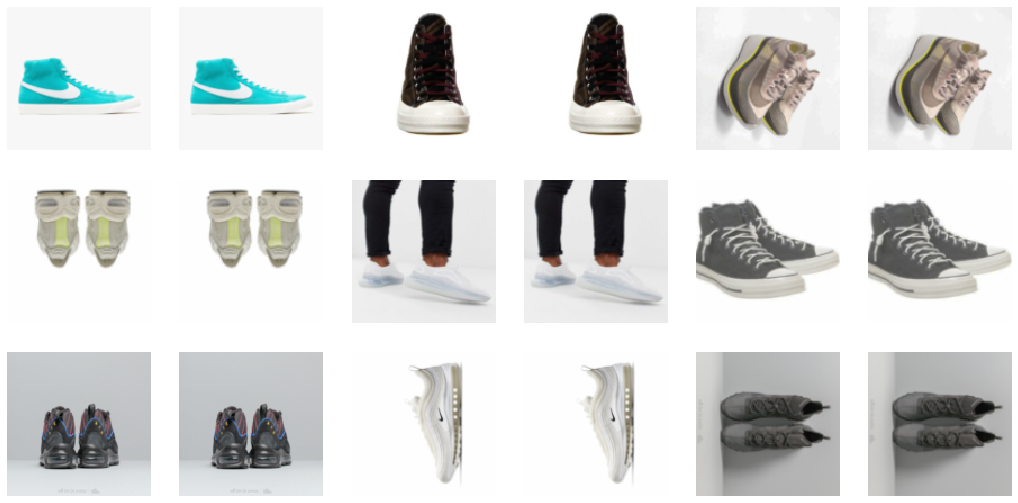
shoe_dls.show_batch()
- Get your autoencoder model in place here
class AutoEncoder(nn.Module):
    ... # You can find any number of decent models online

model = AutoEncoder()
- Create a learner out of the components now
learn = Learner(shoe_dl, AutoEncoder().to(device), loss_func=nn.MSELoss())
- And that's it! We can now
lr_findandfit_one_cycleas we want like the standard tutorials tell
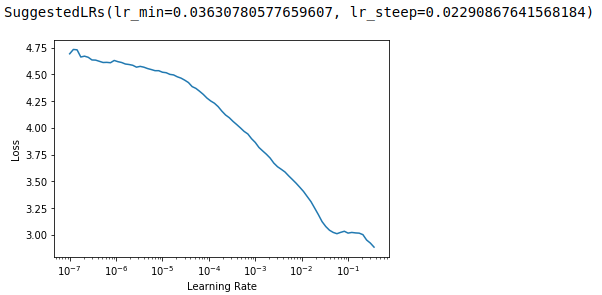
learn.lr_find()
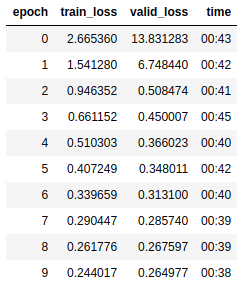
learn.fit_one_cycle(10, 1e-2)
Ain't that easy? You have taken advantage of a plethora of library utilities like fit_one_cycle, lr_find, kornia's augmentations, and more techniques in theory such as progressive-resizing, half-precision and more!